Apple just warned iPhone users of government‑targeted spyware – what every small business must do now
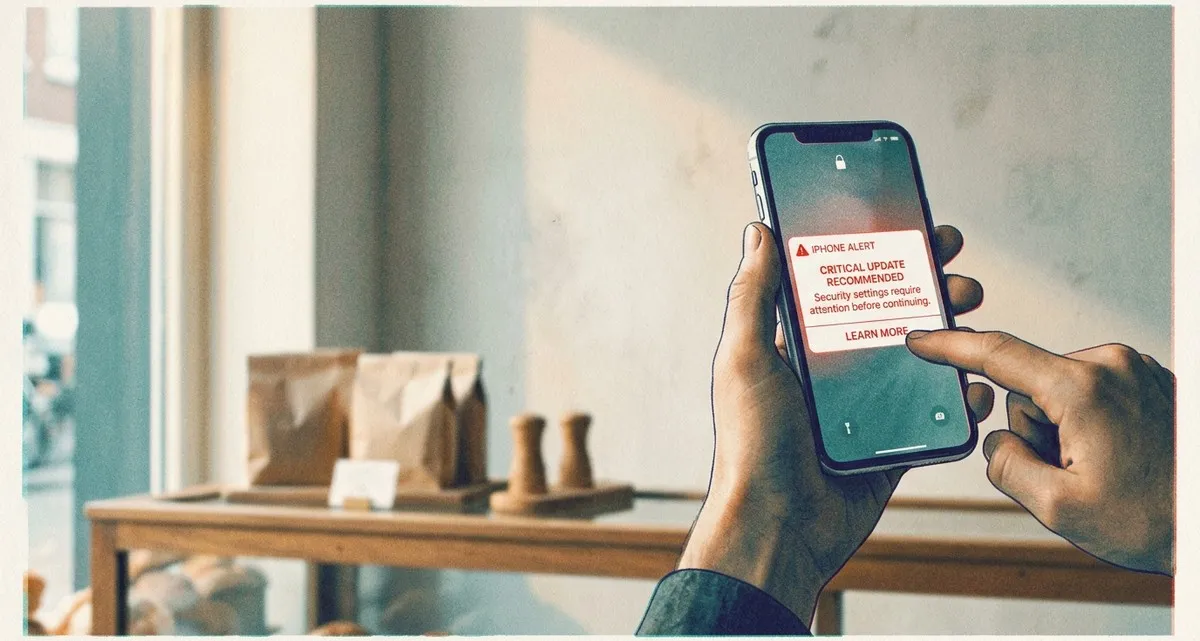
Apple’s new lock‑screen warning – why you should take it seriously
Apple has started sending a bold push notification about government‑targeted spyware directly to the lock screen of iPhones, iPads and Macs that it believes are being targeted by government‑backed spyware. The alert reads:
“Apple detected a mercenary spyware attack targeted at your iPhone. There are actions you can take now to protect your data and device.”
If you see this message, it’s not a marketing gimmick – it’s a signal that someone may be trying to spy on your device. For a small business that uses iPhones for email, mobile payments, or storing customer contacts, the stakes are high. A compromised device can lead to data breaches, fraudulent transactions, and damage to your reputation.
What the threat means for small businesses
Real‑world consequences
- Data breach – Spyware can silently copy contacts, emails, and financial information. If a customer’s personal data leaks, you could face legal penalties and lose trust.
- Payment fraud – Many point‑of‑sale apps run on iPhones. A compromised device could be used to skim card details or approve unauthorized payments.
- Reputational damage – News of a breach spreads quickly, especially in tight‑knit local markets. Recovering credibility can take months and cost more than the initial loss.
Why government‑targeted spyware is no longer a distant threat
Spyware that was once limited to high‑profile activists is now sold on the open market and can be purchased by anyone with enough money. The technology has become more affordable and easier to deploy, meaning even small businesses can become accidental targets—especially if they handle sensitive customer data or political content.
Practical steps to secure your devices
Step‑by‑step checklist for the spyware alert
-
Read the notification carefully
When the lock‑screen alert appears, tap the “Learn More” link. Apple will guide you to a support page with detailed instructions. -
Enable Lockdown Mode – a special security setting that blocks many background activities that spyware could use
- Open Settings → Privacy & Security → Lockdown Mode.
- Turn it on. This mode disables many background activities that spyware relies on, such as certain web technologies and incoming invitations. Apple says no known attacks have succeeded while Lockdown Mode was active.
-
Update iOS immediately
- Go to Settings → General → Software Update.
- Install the latest version. Updates contain security patches that close known vulnerabilities.
-
Review installed apps
- Open Settings → General → iPhone Storage.
- Look for apps you don’t recognize or that you no longer use. Delete anything suspicious.
-
Change passwords and enable two‑factor authentication (2FA) – an extra login step that sends a code to another device
- For any accounts accessed from the device (email, banking, payment processors), update passwords.
- Turn on 2FA to add that extra security step.
-
Back up your data securely
- Use iCloud or an encrypted external backup. A clean backup ensures you can restore a safe version of your device if needed.
-
Consider a professional security audit
- A specialist can scan your device for hidden code, verify that Lockdown Mode is correctly configured, and set up ongoing monitoring for future alerts.
FAQ – your questions about the iPhone spyware alert
Q: Do I need to act even if I haven’t noticed anything odd?
A: Yes. The notification means Apple’s systems have detected suspicious activity. Acting now prevents potential data loss before it happens.
Q: Will enabling Lockdown Mode break my everyday apps?
A: Lockdown Mode restricts some features (e.g., certain web links, FaceTime calls from unknown contacts). Most core business apps continue to work, but you may need to adjust settings for a few tools. The trade‑off is worth the added protection.
Q: My employees also use iPhones – do they need to follow the same steps?
A: Absolutely. The alert is device‑specific, not user‑specific. Ensure every iPhone that accesses business data goes through the same checklist.
Keep your business safe with IT Move NL
Dealing with a possible spyware attack can feel overwhelming, especially when you’re focused on serving customers and growing your business. Our Security & Protection service removes the guesswork:
- We audit all your iPhones, enable Lockdown Mode correctly, and verify that the latest security patches are installed.
- We set up continuous monitoring so you receive immediate alerts if Apple or any other source flags a device.
- We provide a clear, jargon‑free report and actionable recommendations, so you can keep your data, payments, and reputation secure.
Don’t let a hidden threat linger on your lock screen. If you’d like a quick security check‑up, just drop us a line – we’ll walk you through the steps.
Sources:

He/Him · AWS Certified Solutions Architect | Cloud Engineer @ Essent
Cloud Engineer at Essent B.V. with 10+ years of experience in the tech industry. AWS Certified, passionate about serverless architectures, Infrastructure as Code, and DevOps. Proficient in TypeScript, Python, and Terraform. Based in Amersfoort, Netherlands.
STAY IN THE LOOP
// Cloud, AI & DevOps insights — straight to your inbox.
No spam. Unsubscribe anytime.
// Related articles
Need help with your cloud infrastructure?
Our team of experts is ready to help you navigate the complexities of modern cloud architecture.
Get in Touch