AI Can Fake Reality. Here’s How to Protect Your Business
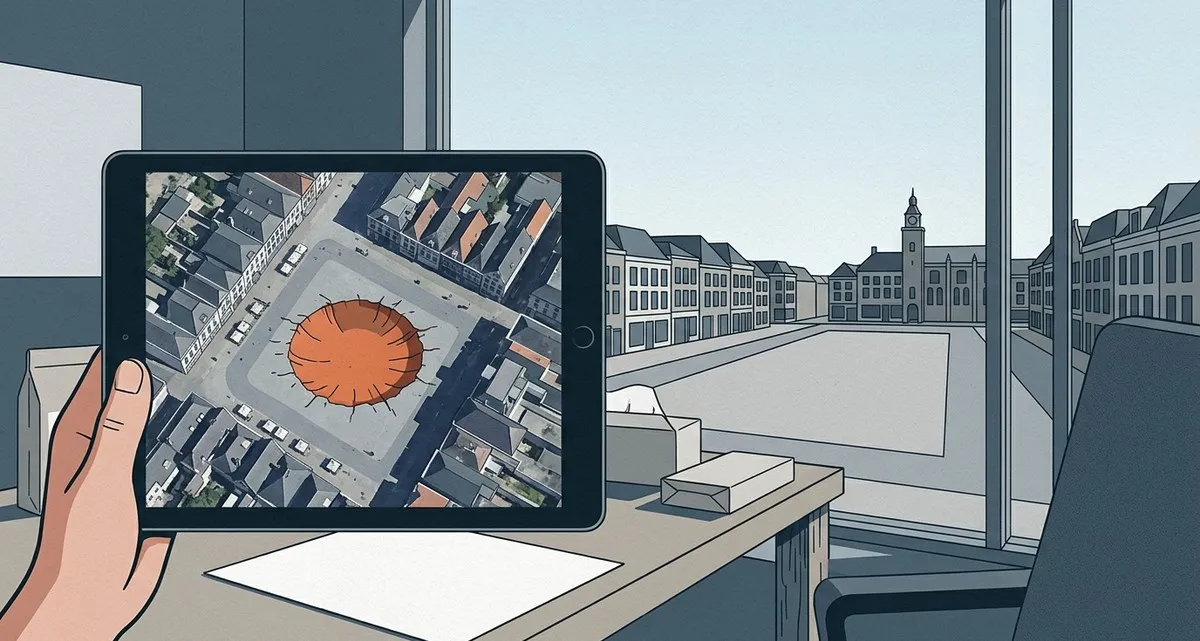
Image generated with AI
This article and its cover image were generated with artificial intelligence (AI).
AI Can Fake Reality. Here’s How to Protect Your Business
Imagine a customer sees a photo of your shop after a fire. Smoke, broken glass, emergency vehicles — all clear in high-resolution satellite view. They call you in panic. But you’re standing in your fully intact store, confused. No fire ever happened. Someone just made it look like it did.
Google recently launched — and then pulled within a day — an AI feature in Google Earth that let users alter satellite and aerial images. With a few clicks, you could add a bomb crater to a quiet town square, place a car crash on a clear highway, or insert a new building where none existed. The tool was meant for harmless creativity: visualising urban plans, exploring historical reconstructions, or imagining future developments.
But people started using it to fake disasters.
Within hours, users were generating and sharing images of fake destruction — not as jokes, but as convincing visuals that could easily be mistaken for real. Google responded fast. It removed the feature, admitting the AI made it too easy to create misleading content. The company said it undermined trust in Google Earth, a service people rely on for accurate, real-world visuals.
This wasn’t just a glitch. It was a wake-up call.
Why This Matters for Your Business
You didn’t use the tool. Your business didn’t create the fake images. But your customers now live in a world where seeing is no longer believing.
And that changes everything.
Real estate, tourism, logistics, and hospitality all rely on the assumption that what customers see online is real. But now, that assumption is fragile.
Think about what your business depends on: a real estate agency showing property views from above, a tourism company promoting scenic locations with aerial shots, a logistics firm using maps to prove delivery routes, a restaurant sharing its location with a satellite preview.
All of these rely on the assumption that digital visuals are trustworthy. But when AI can alter satellite images so convincingly that even experts pause, that trust starts to crack.
It’s not just about fake craters. It’s about fake storefronts, fake damage, fake locations. A competitor could generate an image of your shop boarded up and share it online. A scammer could fake a disaster at your warehouse to manipulate suppliers. A customer could believe your location is unsafe — not because of anything you did, but because of an image that never showed real ground.
This is the new risk: your brand’s credibility is only as strong as the public’s belief in digital truth.
And right now, that belief is under pressure.
The Problem with “Safeguards”
Google didn’t ignore the risks. It tried to protect against misuse. For example, it added a digital watermark — called SynthID — to AI-generated images, meant to signal they weren’t real.
But here’s the catch: watermarks can be cropped out. They can be blurred. They can be ignored by people who don’t know to look for them.
And most people won’t.
The deeper issue? These tools are designed to be easy. That’s their appeal. But ease also means abuse. When anyone can alter reality in seconds, verification becomes your responsibility — not the platform’s.
What Should Business Owners Watch For?
You don’t need to become an AI expert. But you do need to be aware of where your business is vulnerable.
Here’s what to keep an eye on:
1. Visual claims about your location or property
If your business relies on maps, satellite views, or location-based marketing, assume someone could alter them. Monitor how your premises appear online — not just on Google Maps, but across social media and news platforms.
2. Customer trust in digital content
Ask yourself: would a customer believe a fake photo of your business? Could a doctored image damage your reputation before you even know it exists? If yes, you need a plan to respond — fast.
3. AI tools your team might use
Are you or your staff using AI to create visuals, edit photos, or generate content? Make sure those tools have ethical safeguards. Not all AI apps tell you when content is synthetic — and some remove watermarks by default.
4. Partners and vendors using AI
If you work with agencies or freelancers who create marketing visuals, ask how they use AI. Are they verifying the authenticity of what they publish? A single misleading image can reflect on your brand, not theirs.
What You Can Do Now
Start with awareness. Talk to your team about the risk of AI-generated misinformation. Then take practical steps:
- Monitor your digital footprint using alerts and image search tools to catch altered visuals early.
- Use trusted platforms. Stick to services that label AI-generated content clearly. Avoid tools that don’t disclose their sources or allow anonymous publishing.
- Build verification into your workflow. If you publish visuals, make sure they’re traceable and authentic. Consider adding your own timestamps, watermarks, or verification notes.
- Work with partners who take AI ethics seriously. Not all tech providers treat AI safety as a priority. Choose ones who build safeguards into their systems — not as an afterthought, but as a core feature.
FAQ
Can AI really fake satellite images well enough to fool people?
Yes — the Google Earth example showed realistic edits like bomb craters or new buildings generated in seconds. To most viewers, they look real.
Can I tell if an image has been AI-edited?
Not always. Digital watermarks like Google’s SynthID help, but they can be removed. Without technical tools or expert analysis, it’s often impossible to spot a fake.
Should I stop using AI tools in my business?
No — but use them wisely. The problem isn’t AI itself. It’s using AI without safeguards. Choose tools and partners that prioritise transparency and verification.
This Is Why You Need the Right Partner
AI isn’t going away. In fact, it’s becoming essential for businesses that want to stay competitive — in marketing, customer service, operations, and more.
But adopting AI shouldn’t mean risking your reputation.
At IT Move NL, we help businesses adopt AI safely — with verification layers, watermark detection, and ethical boundaries built in. We add it because it’s responsible.
Because innovation shouldn’t come at the cost of trust.
If you’re thinking about using AI in your business — or you’re already using it and want to make sure it’s secure — we can help. Let’s build something smart and safe.
Sources:

Reviewed by
David Velarde RoblesHe/Him · Content reviewer · AWS Certified Solutions Architect | Cloud Engineer @ Essent
Cloud Engineer at Essent B.V. with 10+ years of experience in the tech industry. AWS Certified, passionate about serverless architectures, Infrastructure as Code, and DevOps. Proficient in TypeScript, Python, and Terraform. Based in Amersfoort, Netherlands.
STAY IN THE LOOP
// Cloud, AI & DevOps insights — straight to your inbox.
No spam. Unsubscribe anytime.
// Related articles
Need help with your cloud infrastructure?
Our team of experts is ready to help you navigate the complexities of modern cloud architecture.
Get in Touch